
Let’s be honest. Most people spend weeks “planning” their website, choosing fonts, debating color palettes, rewriting their About page five times, and never actually launch.
Meanwhile, someone with half the knowledge and twice the confidence hit “Publish” last Tuesday. And they’re already showing up on Google.
Here’s the uncomfortable truth: over 53% of all website traffic comes from organic search, yet most new websites fail to capture it because of poor setup and slow execution. The problem isn’t that your idea is bad. It’s that your website doesn’t exist yet, or exists in a form that search engines can’t find.
The good news? The gap between “invisible website” and “traffic-generating website” can be closed in about 10 minutes, if you know what to focus on. This checklist will show you exactly that.
Step-by-Step Guide to Building a Website in 10 Minutes for Beginners 2026
1. Pick a Platform That Does the Heavy Lifting
Too many beginners freeze at step one because the options feel overwhelming. WordPress? Wix? Squarespace? Webflow? It’s easy to spend three days researching and do nothing. Try Hostinger for free and launch your first lightweight website in minutes.
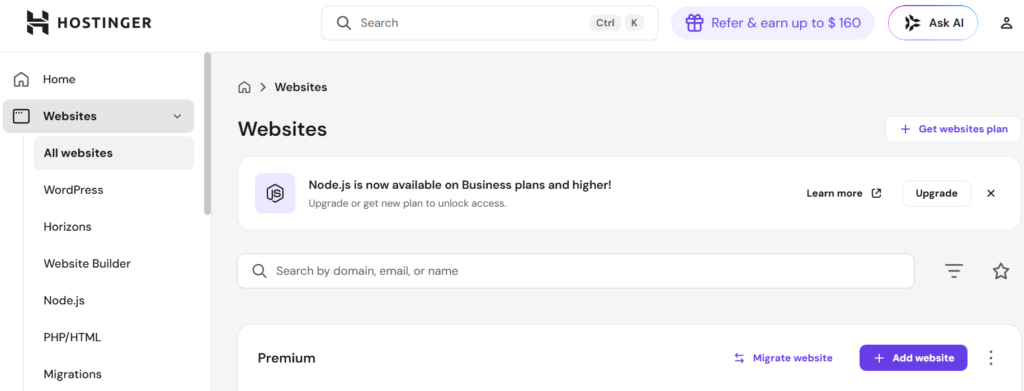
Here’s what actually matters: pick a platform that combines hosting, design, and basic automation in one place. Tools offering an AI website builder with fast setup can generate a complete layout, text, and structure in minutes. You answer a few questions about your business, and the system builds the skeleton.
2. Choose Hosting That Doesn’t Slow You Down
Think of your hosting like the foundation of a shop. If the foundation is shaky, nothing built on top of it will hold.
A slow website drives visitors away before they even read your headline. And the worst part? You won’t even know it’s happening. Many beginners go for the cheapest hosting they can find and end up with sluggish load times, frequent crashes, and support that ghosts you when you need help most.
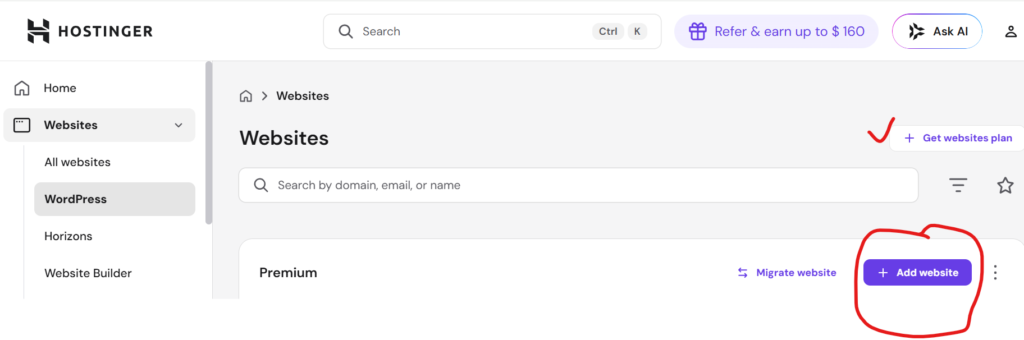
Aim instead for affordable web hosting for beginners that includes speed optimization and basic security. Platforms like Hostinger are a popular pick here. They bundle fast servers, a beginner-friendly dashboard, and even a free domain into a single affordable plan, without the usual trade-off in quality. The price difference versus bargain-bin hosting is often just a few hundred rupees a month, but the performance gap is enormous.
Hard Truth: If your page takes 6 seconds to load, a visitor searching “nearby salon” will hit the back button and choose your competitor. You never even got a chance.
3. Buy a Domain That Sticks
Your domain name shapes first impressions.
If people can’t remember it, they won’t return.
Keep it:
- Short (2–3 words)
- Clear (no confusing abbreviations)
- Easy to say
“CaliforniaCakes.com” works. “CL-BakeSolutions123.net” doesn’t.
A simple domain increases recall and direct visits over time.
4. Use a Clean, Mobile-Friendly Template
Fancy design often backfires.
Heavy animations and clutter slow your site and confuse visitors.
With over 60% of users browsing on mobile, your layout should:
- Load quickly
- Look clean on small screens
- Guide users to take action
A page with “Call Now” and “View Pricing” buttons converts better than a visually complex design.
5. Build Only What’s Necessary
Overbuilding delays your launch.
You don’t need a perfect website—you need a live one.
For website setup for a small business, start with:
- Home
- About
- Services / Products
- Contact
Keep it simple. Expand later.
6. Set Up Basic SEO (Your Traffic Engine)
Without SEO, your site stays invisible.
Search engines need clarity to rank your content.
Start with:
- One keyword per page
- Clear headings (H1, H2)
- Meta title and description
Using the AI website builder’s fast setup tools makes this easier by generating SEO-friendly structures automatically.
For instance, a fitness coach targeting “weight loss coach Colorado” should include that phrase naturally in headings and descriptions.
7. Optimize Speed Immediately
Speed impacts both ranking and user behavior.
Even a one-second delay can reduce engagement.
Quick fixes:
- Compress images before uploading
- Avoid unnecessary plugins
- Use built-in optimization tools
Fast websites retain users. Slow ones lose them.
8. Install Analytics Early
Data removes guesswork.
You don’t need advanced skills; you just need to do basic tracking.
Set up:
- Google Analytics
- Google Search Console
These tools show:
- Visitor sources
- Popular pages
- Drop-off points
If users leave your homepage quickly, you’ll know something needs fixing, maybe unclear messaging or slow load time.
9. Publish One Useful Page Today
Perfection delays progress.
Waiting for everything to be ready is the biggest mistake.
Start with:
- A service page
- A helpful blog
- A simple landing page
Traffic begins only after publishing.
10. Promote Right After Launch
Traffic doesn’t appear automatically.
Your first visitors will come from sharing.
Start with:
- WhatsApp contacts
- LinkedIn updates
- Instagram stories
“Just launched my new website—would love your feedback!” works better than a sales pitch.
If you’re more of a visual learner, this beginner-friendly tutorial by Hostinger walks you through the entire website setup process:
Don’t Let Budget Hold You Back
Starting small is a smart move, not a limitation.
The market is full of affordable web hosting for beginners that delivers high-tier speed, security, and reliable support without breaking the bank.
Nowadays, even cheap hosting plans often bundle powerful AI tools for automated content generation, SEO, and layout design. These tasks that used to cost thousands of dollars are now outsourced.
The real barrier to entry is no longer your budget; it’s your own hesitation to hit “Publish.”
Your website doesn’t need to be perfect; it needs to be live.
You can also start your own blogging website easily. Watch this video for more information:
Most people fail because they never launch.
Focus on:
- Speed
- Clarity
- Simplicity
A fast, clear, and simple website setup for a small business will always outperform a perfect site that never goes live.
Frequently Asked Questions
Q1. How much does it cost to build a website in 2026?
Less than most people expect. A basic website can go live for as little as $3 to $5 a month. That usually covers hosting, an SSL certificate, and access to a website builder. Your domain name adds roughly $10 to $15 a year. Platforms like Hostinger bundle most of these essentials into a single affordable plan, so you’re not paying separately for things that should come standard.
Q2. Do I need to know coding to build a website?
Not at all. Modern drag-and-drop builders and AI website builder fast setup tools let you launch a fully functional website without writing a single line of code. You pick a template, fill in your details, and the platform handles everything technical.
Q3. How long does it take for my website to appear on Google?
Anywhere from a few days to a few weeks. You can speed this up by submitting your sitemap to Google Search Console right after launch. It’s free, and it signals Google to index your site faster. Publishing content with clear keywords from day one helps too.
Q4. Is shared hosting good enough for a small business?
For most beginners, yes. Shared hosting is the most affordable web hosting for beginners and handles everyday traffic comfortably. Just make sure your provider doesn’t sacrifice speed for a low price tag. You can always upgrade as your traffic grows.
Q5. Can I build a website on my phone?
Yes. Most modern builders let you create pages and publish content from your smartphone. For the initial setup, though, a desktop makes things like domain configuration and SEO settings much easier to manage. Use your phone for quick edits and updates once the site is live.